


Live view
The goggles feed in a browser.
Cosmik Streamer gives the crew a local live view while the pilot flies.
FPV drone software · Raspberry Pi 4 · DJI Goggles 3
Live-broadcast your FPV feed to phones, laptops and screens — over the Streamer's own Wi-Fi or HDMI, with no internet needed. Your crew, your client or your audience watch in a browser, ask for the clips they want, and every flight is recorded with its telemetry.
Built by a professional drone pilot. Used while flying inside stadiums.
$29.99 USD · one payment · software only. Checkout is not open yet — we are finishing the PayPal payment path. Email support@cosmikstreamer.com to be told the moment it opens.
$29.99 USD, one payment, software only. Pay with PayPal — your balance or a card — and your key arrives by email. 14 days to change your mind.

 Actual product interface
Browser control. No separate control app.
See every working screen →
Actual product interface
Browser control. No separate control app.
See every working screen →
Live view
Cosmik Streamer gives the crew a local live view while the pilot flies.
Crew view
Directors, clients, spotters, and crew can watch without using the owner controls.
Exact product UI
This is the current Cosmik Streamer Flight View, not a recreated dashboard.
Signal path
Video and radio arrive by different routes; Cosmik brings them together without changing the pilot's feed.

Your goggles work exactly as they always do. Cosmik takes a copy afterwards and never sits between you and your aircraft.
One USB-C cable from the goggles to the Raspberry Pi. That is the whole connection.
Battery, signal strength and position come from your ELRS radio over its own link, separately from the video. GPS appears if your aircraft reports it.
Anyone you allow opens a browser and watches — no app to install. You decide who sees what, and your own controls stay behind a password.
Play the flight back, mark the moments worth keeping, and handle the clips people asked for — all in the same browser.
Browsers over Wi-Fi, a screen over HDMI, or a live stream to the internet. Each one runs on its own and none of them disturbs the others.
Flight Log
Cosmik records the link, picture, battery, and available aircraft data once a second, then keeps every track aligned to the same moment in the recording. Four views read the same flight — including the route itself, flown back in three dimensions.

Fly the route back in three dimensions and read any moment on it.
Exact current interface · real recorded flightthe Streamer writes the flight down without being asked
orbit it, scrub it, and open the footage from any point on the line
a break longer than four seconds stays a dashed line rather than a guess
the Streamer makes its own Wi-Fi so you can fly where there is no internet, and map backgrounds have to be downloaded. A measured metre grid is drawn instead. Height is the aircraft's own estimate, and the view says so on screen.
See the whole system
One local box branches the picture into viewing, recording, production review, remote destinations, and a crew display without turning the pilot path into a graphics pipeline.

Clip requests
Cosmik records the goggles feed as a review copy. A director or crew member can call out a precise section, say who asked, explain why, and leave the request in a queue for production.

Built now
Play a recording, drag the In and Out handles, add a name and note, then approve or finish the request from the same library.
Free companion utility
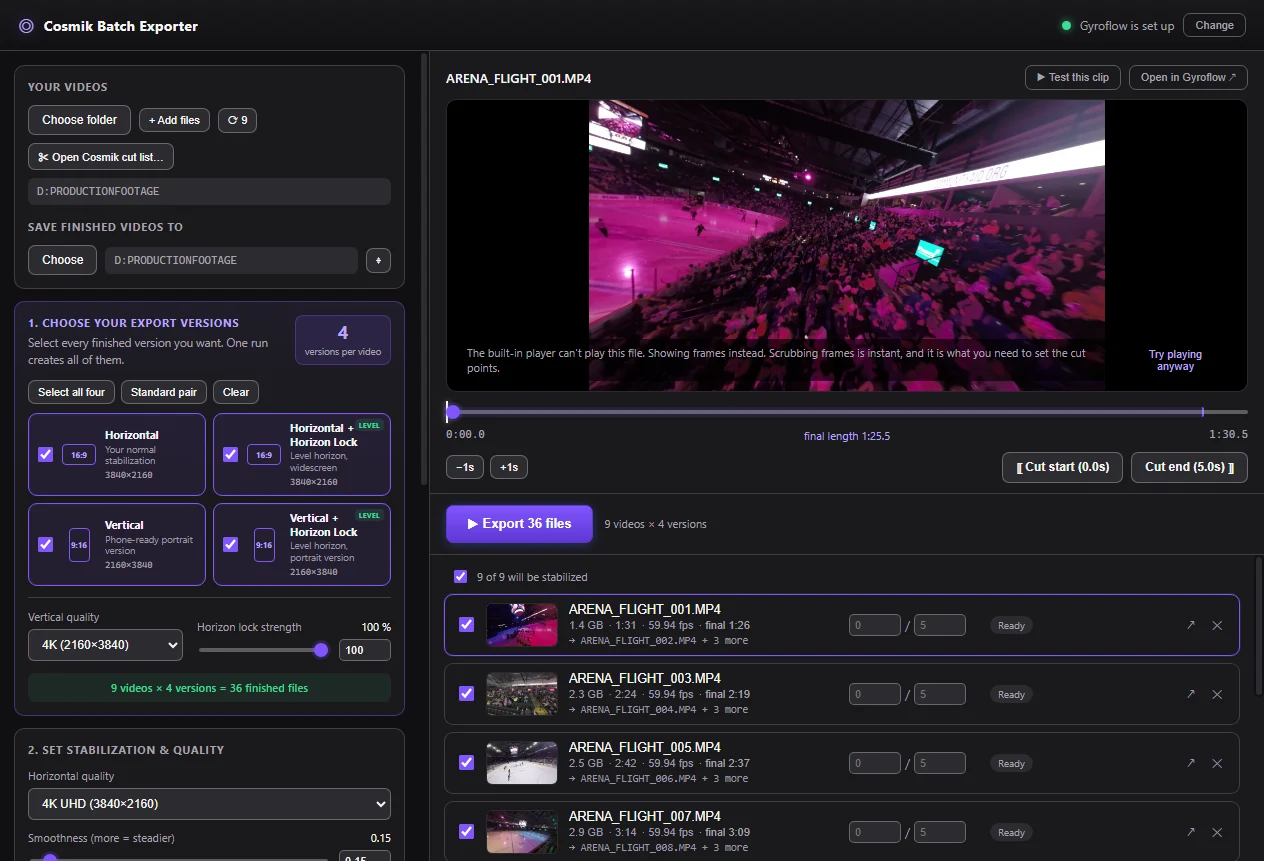
Cosmik Batch Exporter opens the shot list bundle from Streamer, applies the requested trims, and sends the queue to an installed copy of Gyroflow.
How they connect: the Streamer writes the shot list onto the same card your footage is already on. Put that card in the editing computer and the Exporter reads it. Nothing is sent over a network, and there is no folder to hunt for.
One job, five stages
The pilot path stays a direct copy while viewers and recording branch away.
AvailableDrag In and Out on the review recording; add the requester, a contact, and the edit note.
AvailableApprove, finish, remove, or export outstanding requests as a shot list.
AvailableCosmik reads the card, matches each mark to the aircraft's own file, and names it in the shot list. It lands the moment within about five seconds; a frame-exact confirmation step is not built.
AvailableOne GyroFlow project per outstanding request, plus the shot list and instructions — written straight to the card by a single button.
AvailableThe product, not a mockup
Grouped the way a job runs, not the way the menu is ordered. Every image is the real interface. Where a screen shows a video tile, it is a labelled placeholder, never passed off as footage.
Used on a real stadium job
Choose any clip to see the picture your crew gets in a browser.

Production integration
OBS receives Cosmik as a Browser Source. From there, build the scene with graphics, venue audio, recording, streaming, and display outputs.


Keeps the complete goggles picture. OBS handles its position, size, and graphics.
02 / COMPOSEOBS scenePicture + venue audio + graphics
Cosmik controlling OBS recording, streaming, or scene switching through a password-protected connection is not built yet.
Cosmik supplies the picture. OBS combines it with the rest of the production.
Current capabilities
Each links to the full record.
Guest viewing stays separate from the password-protected owner console.
Auto-start, thumbnails, browser playback, download, and deliberate per-file deletion.
Each publisher runs independently while the local picture and recording continue.
Fit, Fill, Crop, logo, lower-third, timecode, and a live proof image.
The Streamer recognises the screen you plugged in and restores the Fit, Fill, or Crop you chose for that exact monitor. Verified on hardware with the live feed.
Orbit the line you flew, or read the same flight as a timeline, and jump from any moment straight into the footage. How smoothly the 3D view runs on a phone has not been measured yet.
Set live viewing and flight data separately to off, open to everyone on the network, or code-only — then revoke a code when the job ends.
The writer and controls are built. Saving a permanent clip out of the buffer is not built, and the console does not offer it.
Scanning, joining, leaving, and channel safety are built and test-covered. The join has never been run on real hardware, so it is not claimed as working yet.
Separate video paths
The incoming H.264 picture stays a direct copy. Only the optional broadcast output is re-encoded for framing and overlays.
No scale, crop, logo, or lower-third is inserted into the path used for the ordinary live view.

The Raspberry Pi hardware encoder creates a separate framed and branded feed for production or a destination.
Available works today. Validation works, with one check outstanding. Planned and Research are not built yet. The full record names the evidence for each.
Price
Includes one replacement licence transfer. Checkout is not open yet — we are finishing the PayPal payment path. Email support@cosmikstreamer.com and we will tell you the moment it opens.
Includes one replacement licence transfer. Pay with PayPal — with your PayPal balance or a card — and you see the total before you confirm.
Payment received — thank you. Your licence key is on its way to the email address you paid with. It usually arrives within a few minutes. If you cannot find it, check your spam or junk folder first — that is where it goes most often. Still nothing after that? Email support@cosmikstreamer.com and a person will sort it out.
Raspberry Pi 4, suitable storage, stable power, USB-C connection, goggles, and the screen your crew will use. See the verified build guide.
Browser control, live view, recording, media review, clip requests, outputs, branding, and one replacement transfer.
We are finishing the payment path, and we would rather show you nothing than a button that cannot complete. Email support@cosmikstreamer.com and we will tell you the moment it opens.
You buy directly from Cosmik Drones LLC. PayPal handles the payment details — your balance or a card — and we never see your card number; the sale, and anything that goes wrong with it, is ours.
Before you buy, read the Terms & Conditions — including the safety disclaimer in section 5 — the Refund Policy, which gives you 14 days to change your mind for no reason, and the Privacy Policy. You buy directly from Cosmik Drones LLC; PayPal processes the payment.
Common questions
No for local viewing, recording, media review, and browser control. Internet is needed only when you send video to an internet destination such as a streaming platform.
Not through the ordinary visitor address. Guests get a watch-only view; the separate owner console is protected by the password created during setup.
No, and it never touches it. The Cosmik recording is a review copy. When you write the shot list to the card, Cosmik reads that card without altering it and works out which of the aircraft’s own recordings each marked shot belongs to, so the finished clip is cut from the drone’s full-quality file and its motion data — not from the review copy. It lands the moment within about five seconds; a frame-exact confirmation step is not built.
None. The $29.99 USD price is for the software licence only. The Raspberry Pi, storage, power hardware, cables, goggles, drone, and displays are supplied by the customer.
The licence includes one replacement transfer. The self-service redemption process is not built yet — email support@cosmikstreamer.com and a person will handle it.
No. A new key is issued unbound and binds locally to the first compatible Raspberry Pi where it is activated.
Broader camera support is a future direction. No additional camera system is being named as compatible until it has been selected and tested.
It is a separate free desktop utility. Anyone may use it without buying Cosmik Streamer or activating a licence. Streamer can export a shot list bundle that the Exporter opens on the editing computer.
